Category Archives: TechNews

December’s Cybersecurity Focus: Charity and Disaster scams

Are you following the Israel-Gaza crisis in the news and want to help by donating to a charity? Scammers follow the news, too, and are at the ready. Just like in the wake of a natural disaster, scammers set up fake charities and fake websites to take advantage of your generosity. Here’s how to avoid charity scams and make sure your donation counts.

First, slow down and take some time to research and plan before you donate to make sure your money helps real people in need and not the charity scammers.

Here’s where to start:

  • Donate to charities you know and trust with a proven track record with responding to a humanitarian crisis.
  • Research the organization — especially if the donation request comes on social media. Search the name plus “complaint,” “review,” “rating,” or “scam.” And check out the charity with the Better Business Bureau’s (BBB) Wise Giving Alliance, Charity Navigator, Charity Watch, or Candid. If the message was from a friend, ask them if they know the organization themselves. Find out exactly how much of every dollar you donate goes directly to the charity’s beneficiaries.
  • Be cautious about giving to individuals on crowdfunding sites. Some scammers pretend to be concerned citizens collecting for a cause but their true intentions are to pocket your money rather than give it to the cause. Giving to someone you personally know and trust is safest. Review the platform’s policies and procedures. Some crowdfunding sites will check out postings asking for help after a humanitarian crisis to confirm they’re legit. Others don’t.
  • Donate money rather than goods unless you confirm what’s needed. If you want to send goods like clothing or supplies, it’s a good idea to confirm with the charity what items they are collecting.
  • Don’t donate to anyone who insists you pay by cash, gift card, wiring money, or cryptocurrency. That’s how scammers tell you to pay. If you decide to donate, pay by credit card, which gives you more protections.
  • Confirm the number before you text to donate. Go straight to the charity to confirm the number. If it’s not their number, use a number you know is real or go to the charity’s website to donate.

To learn more, go to ftc.gov/charity. Source: https://consumer.ftc.gov/consumer-alerts/2023/10/safely-donating-response-israel-gaza-crisis

Winterizing Your Laptop: Essential Tips for the Cold Season

Keep Your Tech Toasty: How to Protect Your Laptop This Winter

As the chill of winter sets in, it’s not just your wardrobe that needs adjusting. Your laptop, a crucial companion in your daily life, also needs special care to combat the cold. Here are essential tips for winterizing your laptop:

  • Temperature Control: Laptops are sensitive to extreme temperatures. When moving from a cold environment to a warm one, condensation can form inside, which might damage the internal components. Allow your laptop to acclimatize gradually to indoor temperatures before turning it on. 
  • Battery Care: Cold temperatures can drain battery life more rapidly. Keep your laptop fully charged and consider carrying a portable charger. Avoid leaving your laptop in a cold car for extended periods, as this can significantly impact battery health.
  • Moisture Management: Winter means more moisture, be it from rain, snow, or condensation. Ensure your laptop bag is waterproof or has a protective sleeve. If your laptop does get wet, turn it off immediately and let it dry thoroughly before use.
  • Static Electricity Precautions: The dry winter air increases static electricity, which can be harmful to electronic devices. Use an anti-static wrist strap or regularly ground yourself by touching a metal object to prevent static discharge.
  • Regular Cleaning: With more indoor time, your laptop might accumulate more dust and debris. Regularly clean the keyboard, screen, and vents to ensure optimal performance and to prevent overheating.
  • Software Updates: Keep your software up-to-date. Winter is a great time to perform necessary updates and backups, ensuring your laptop runs smoothly.
  • Heating Solutions: Avoid using your laptop in excessively cold areas. If you must, consider using a laptop heating pad to maintain a stable temperature.
  • Travel Considerations: If you’re traveling, ensure your laptop is securely stored in a padded compartment. Sudden jolts or drops in temperature during travel can be damaging.

By following these simple steps, you can ensure that your laptop stays safe and functional throughout the winter season. Remember, a little care can go a long way in maintaining the health and longevity of your tech devices. Stay warm and connected this winter!

Printer Fleet Refresh Update: Moves Beginning This Week

This week marks the start of our Printer Fleet Refresh at Simmons, as we begin relocating and reducing printers across campus. This move, a part of our strategy to optimize printing resources, will see a 50% reduction in devices, focusing on high-need areas and incorporating advanced features like ‘Tap to Print’ and enhanced scanning. For any queries or assistance, please contact the Technology Service Desk. Thank you for your support during this transition!

Printer Fleet Refresh Coming Over Winter Break

As we head towards winter break, Technology will be refreshing and updating the printer and multifunction device (MFD) fleet across the campus. This refresh is part of an ongoing effort to right-size and optimize our printer resources.

Over the past few years, we have seen a decline in printer utilization as more work and learning has shifted online, especially since the start of the pandemic. In addition, with the closure and relocation of some campus spaces, we no longer require the same number of printers in all locations.

The upcoming refresh will reduce the total number of printers and MFDs by approximately 50%. The remaining devices will be strategically placed in high-traffic public locations and departments with the highest continuing need.

Despite the overall reduction, the new printer fleet will be equipped with technology to improve the printing experience:

  • Tap to Print – Students and employees will be able to print from anywhere on campus by logging into CampusPrint or printing from a Simmons managed computer to the following print queues:
    • Campus Print BW SingleSided
    • Campus Print BW DoubleSided
    • Campus Print Color SingleSided
    • Campus Print Color DoubleSided
  • Enhanced scanning and copying features – Updated MFDs allow scanning directly to Google Drive.

For large print, copy, or scan jobs, we recommend utilizing the Copy Mail Center in the Lower Level of the MCB. The Copy Mail Center specializes in high-volume, high-quality jobs at affordable prices.

Please let the Technology Service Desk know if you have any questions about the upcoming changes or need assistance with printing. We hope these printer improvements will lead to an even more efficient and positive printing experience across Simmons!

Phishing, Rogue Sharkpass/DUO pushes, and Job scams

A “wolf in sheep’s clothing”: someone or something that seems to be good but is actually not good at all

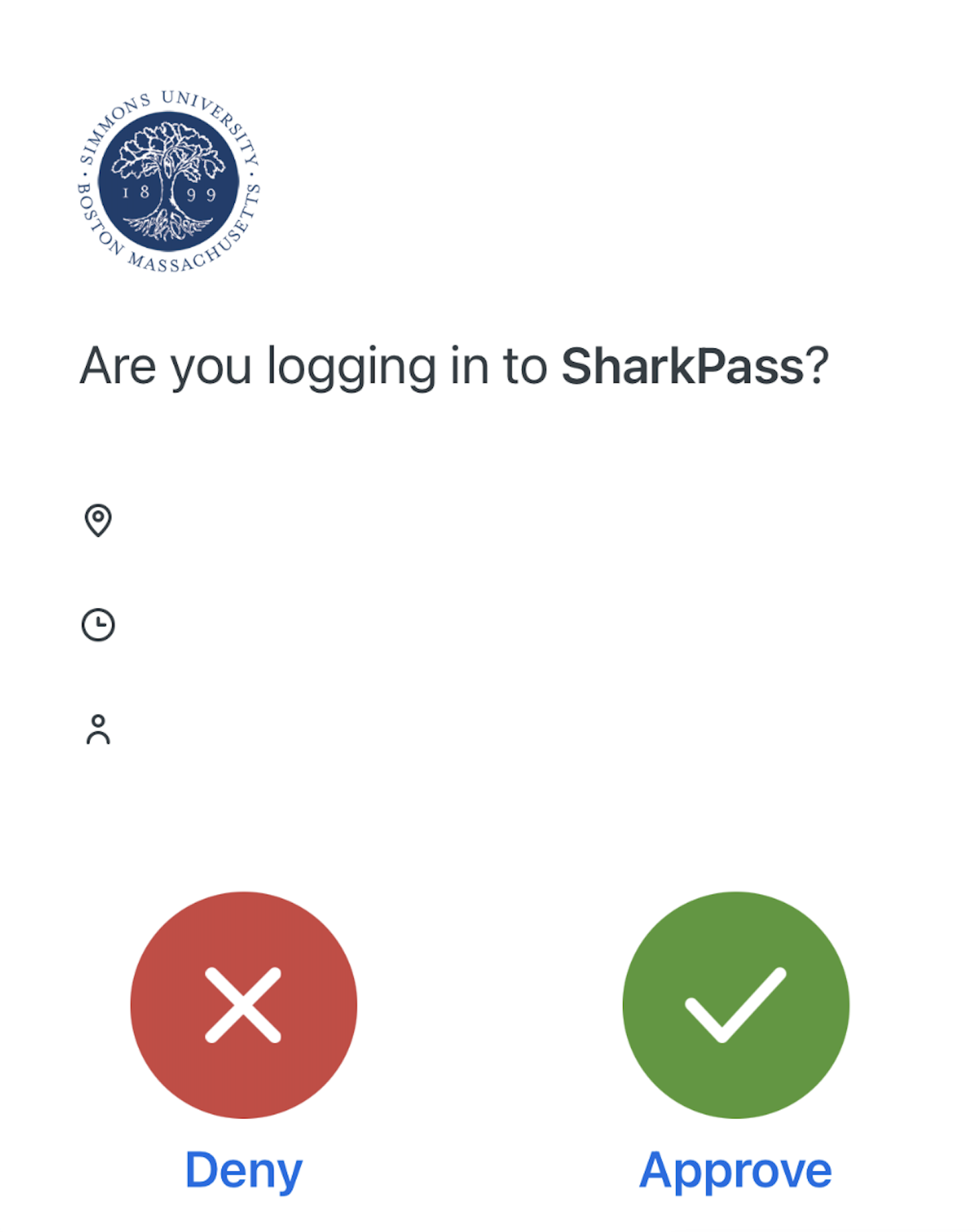
Some of you may have received a Phishing Email with the subject “A file has been shared with you”, or something similar.  This email “appears” to be coming from someone within Simmons or even from an external email address.  Clicking the link brings the victim to a web page that looks like an official-looking webpage and asks them to enter their username and password.  Once that information has been entered on the webpage it is captured by the cyber criminals.

Example of SharkPass

Almost immediately following, the cybercriminals attempt to login to Simmons’s email and systems with the stolen credentials and the victim will receive a Duo authentication request known as a “Rogue Push”, meaning one that was not requested.  If the victim approves the Duo request, then the cybercriminals are allowed in.  Think before you click!

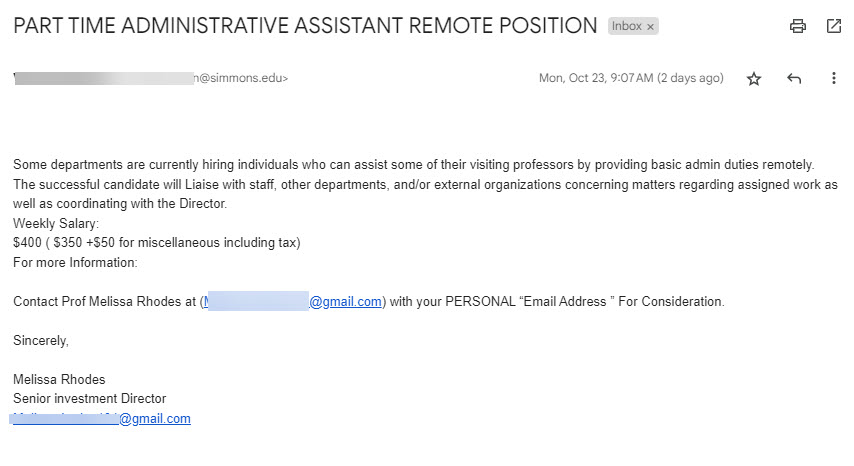
The Job Scam is intended to steal money from the victim in one of two ways.  The first is that they ask for personal information plus a bank name.  They will then send an official looking email from that bank asking the victim to confirm details and maybe to reset a PIN code.  The scammers will try to use this information to login to the bank account and withdraw money.  The second way is to send the victim a paycheck in advance with instructions to use that check to purchase supplies or a computer from their vendor.  The victim purchases these items before the bank has time to clear the deposited check.  The fake check will bounce and the victim is left responsible for the purchases.  Other variations of this scam have involved sending cryptocurrency such as bitcoin to the scammers. 

Example email

As phishing and job scams targeting higher education persist, vigilance is key. Carefully inspect unsolicited emails and do not click links or provide information without verifying legitimacy first. Report suspect message as phishing in Gmail.  Research employers thoroughly when job hunting and avoid requests for upfront fees or personal details. Never provide banking information. Stay alert and contact the IT help desk with any online safety concerns. Using caution and common sense are our best defenses against those looking to take advantage.