
Tag Archives: CybersecurityAwarenessMonth

Beware of Disaster Scams

Remain vigilant for scams particularly related to disasters and other current events. Recent phishing campaigns include emails with attachments or links to fraudulent websites to trick victims into revealing sensitive information or donating to fraudulent charities or causes. Exercise caution in handling any email with Hurricane Ian-related subject line, attachment, or hyperlink, and be wary of social media pleas, texts, or calls related to Hurricane Ian relief efforts.

In general, avoid clicking links in unsolicited emails, never reveal personal or financial information in email and do not respond to solicitations for this type of information. Always verify the sender of email messages.

For more information about phishing and Internet scams, as well as ways to identify them, please visit our Phishing and Scams resource page

Please send any questions or concerns to Simmons Information Security Officer, Richard Phung, or the Technology Service Desk.
Upcoming Sharkpass Duo Updates

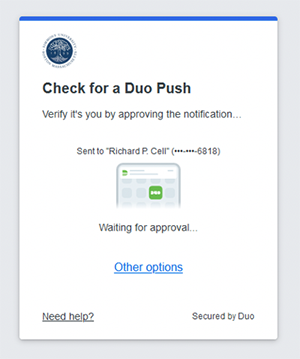
Example of a new Duo Push

Simmons Technology will be updating Duo Security — the technology behind Simmons Sharkpass — to the Universal Prompt which will affect the look-and-feel of logging into Simmons resources. 

After this change, a redesigned prompt will be presented to users at the time they login providing a sleeker, more simplified interface. 


Stay tuned! More details to be announced soon.

October is CyberSecurity Awareness Month

Do Your Part. #BeCyberSmart.

Cybersecurity & Infrastructure Security Agency LogoPhishing and social engineering campaigns are the #1 source of ransomware and other malware1. Reduce your chances of your falling victim to phishing attacks!
  • Update your passwords. Consider using the longest password possible. Be creative and customize your passwords for different websites. Use a password manager to keep track of them.
  • Enable two-factor authentication on your accounts where available.
  • Limit the information you post on social media. Cybercriminals use public information to know you better, so be sure to keep personal information safe from strangers.
  • Keep track of your apps. Make sure your apps are up-to-date and check your app permissions.
  • Update your computer and mobile devices.
  • Make sure your antivirus is up-to-date and running.
  • Stay protected while connected. Only connect to legitimate wireless hotspots. Avoid sensitive activities on public networks and only use sites that begin with “https://” when shopping or banking online.
  • If an email looks suspicious, do not respond and do not click on any links or attachments. When available, “Report phishing” to block other suspicious emails.

[1] 2021 Verizon Data Breach Investigations Report (DBIR)

Did you know….?

According to data breach statistics from 2019…

  • 80% of cyber attacks involved stolen credentials (logins & passwords)
  • 58% of breaches involved personally identifiable information
  • 28% of breaches reported were from the Educational Services Industry
  • 94% of malware is delivered by email
  • 48% of malicious email attachments are office files
  • $3.9 million is the average cost of a data breach
  • $150 the average cost per record stolen
  • 17 million is the average number of files that an employee has access to

Account Icon made by monkik from www.flaticon.com