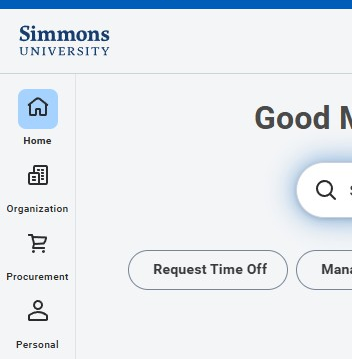
Workday is updating the way you navigate the system on September 19, 2026. The current menu is being replaced with a customizable navigation sidebar, giving you more control over how you organize and access the apps, tasks, and reports you use most often.
With the new sidebar, you can:
- Pin up to four apps for quick access from the Workday homepage. These will replace the current Your Top Apps section.
- Find and add apps available to you directly from the navigation sidebar.
- Reorder apps and categories to organize Workday in a way that works best for you.
- Use the Saved section to quickly access tasks and reports you use frequently.
- Select the gear icon to adjust your navigation preferences—including the option to continue displaying the familiar clickable Menu button.
Need Help?
For step-by-step instructions on using and customizing the new navigation sidebar, see Workday Global Menu Navigation in the Technology Knowledge Base.
Technology will hold two virtual drop-in sessions for anyone who would like help getting familiar with the new navigation:
- Tuesday, September 22, 11:00 a.m.–12:00 p.m. ET
- Wednesday, September 23, 1:00–2:00 p.m. ET
Stop by at any point during either session with questions or for a quick walkthrough of the new sidebar.
Can’t make either session? Email your question to [email protected].