Category Archives: TechNews

Phishing and Social Engineering

Phishing and social engineering campaigns are the #1 source of ransomware and other malware[1].
Phishing is a type of cybersecurity attack where malicious actors send messages pretending to be a trusted person. Social Engineering is the psychological manipulation of people into performing actions like installing malicious software, clicking a malicious link, or divulging sensitive information.

Reduce your chances of your falling victim to phishing attacks!

Beware of messages that:

  • Do not clearly identify themselves or their company
  • Come from an email address that does not match the company’s domain
  • Do not give full contact information such as the title of sender, the company’s physical address, or phone number
  • Make too good to be true offers with no strings attached
  • Ask to pay an upfront fee or asks you to transfer money for them
  • Ask to give your credit card or bank account numbers
  • Ask to send copies of personal documents
  • Remember: DO NOT provide any personal information, especially Social Security numbers or financial information. Legitimate companies would not ask for this information over the phone or email.

If an email looks suspicious, do not respond and do not click on any links or attachments. When available, “Report phishing” to block other suspicious emails.

[1] 2021 Verizon Data Breach Investigations Report (DBIR)

Beware of Disaster Scams

Remain vigilant for scams particularly related to disasters and other current events. Recent phishing campaigns include emails with attachments or links to fraudulent websites to trick victims into revealing sensitive information or donating to fraudulent charities or causes. Exercise caution in handling any email with Hurricane Ian-related subject line, attachment, or hyperlink, and be wary of social media pleas, texts, or calls related to Hurricane Ian relief efforts.

In general, avoid clicking links in unsolicited emails, never reveal personal or financial information in email and do not respond to solicitations for this type of information. Always verify the sender of email messages.

For more information about phishing and Internet scams, as well as ways to identify them, please visit our Phishing and Scams resource page

Please send any questions or concerns to Simmons Information Security Officer, Richard Phung, or the Technology Service Desk.

Upcoming Sharkpass Duo Updates

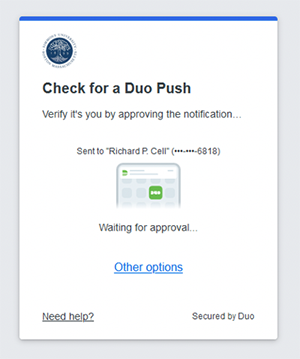
Example of a new Duo Push

Simmons Technology will be updating Duo Security — the technology behind Simmons Sharkpass — to the Universal Prompt which will affect the look-and-feel of logging into Simmons resources. 

After this change, a redesigned prompt will be presented to users at the time they login providing a sleeker, more simplified interface. 


Stay tuned! More details to be announced soon.

Welcome Back

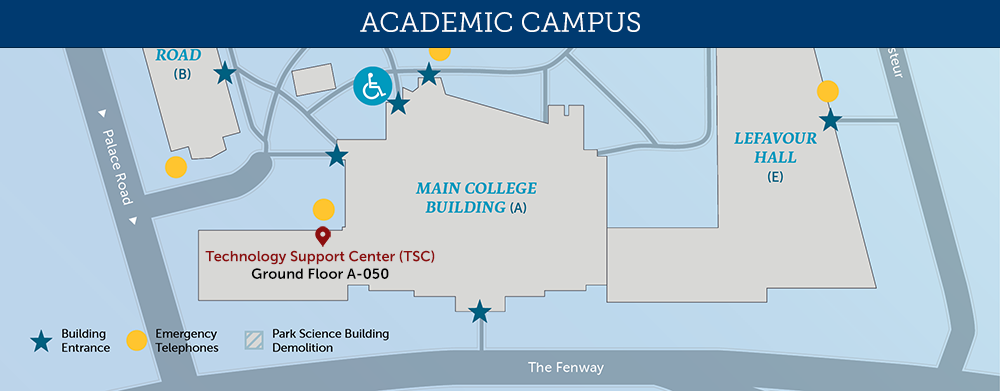
Technology Support Center (TSC) located in MCB Ground Floor A-050

Technology is excited to welcome you back to campus! Whether you’re new or have been here for years, we’re here to assist you. The Technology Support Center (TSC) is located on the ground floor of the MCB, room A-050. TSC’s services, including walk-up support and equipment loans, are available Monday through Friday, 8:00 am to 6:00 pm.

Not on campus or remote?  Our Service Desk provides technical support on a wide variety of topics. We can help you troubleshoot problems with your computer, account access, printing, Zoom, and many other technology-related issues. Our website provides access to many resources including contact information, support hours, FAQs, service and support request forms, classroom and event support information, and hardware and software discounts.

New Workday User Interface

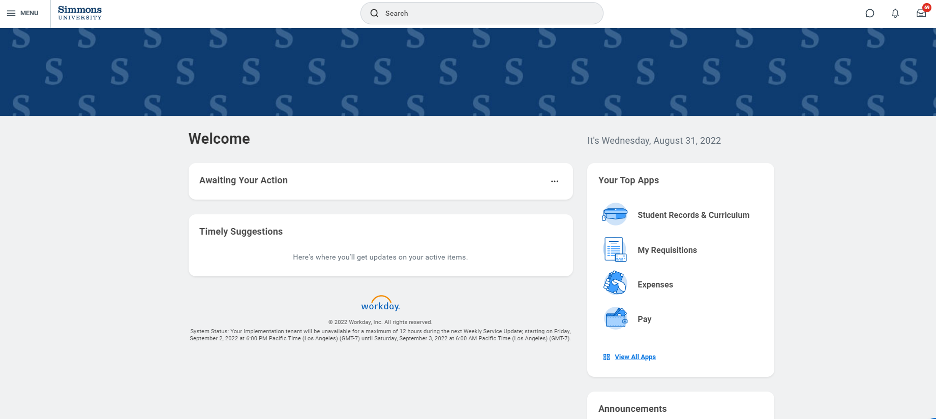
On Saturday, September 10, Workday will update its user interface to a brand new look!  All functionality on the Workday homepage will still be there in a new format.  A new section of the homepage contains Timely Suggestions reminding you of important activities such as reminders to submit your time or upcoming registration appointments.  A new Menu in the upper left corner of every page is where you can access all your familiar Apps and Worklets.

Screenshot of Workday screen with new menu. A new Menu in the upper left corner of every page is where you can access all your familiar Apps and Worklets.

For more information or assistance, please reach out to [email protected].