Tag Archives: Workday Change

Workday Navigation Changes Coming September 19th!

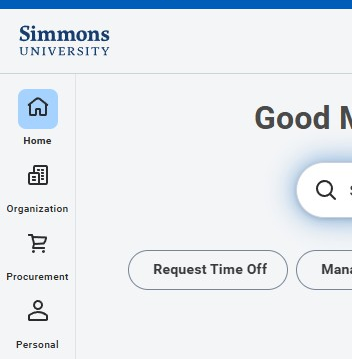
Image of customizable navigation sidebar

Workday is updating the way you navigate the system on September 19, 2026. The current menu is being replaced with a customizable navigation sidebar, giving you more control over how you organize and access the apps, tasks, and reports you use most often.

With the new sidebar, you can:

  • Pin up to four apps for quick access from the Workday homepage. These will replace the current Your Top Apps section.
  • Find and add apps available to you directly from the navigation sidebar.
  • Reorder apps and categories to organize Workday in a way that works best for you.
  • Use the Saved section to quickly access tasks and reports you use frequently.
  • Select the gear icon to adjust your navigation preferences—including the option to continue displaying the familiar clickable Menu button.

Need Help?

For step-by-step instructions on using and customizing the new navigation sidebar, see Workday Global Menu Navigation in the Technology Knowledge Base.

Technology will hold two virtual drop-in sessions for anyone who would like help getting familiar with the new navigation:

  • Tuesday, September 22, 11:00 a.m.–12:00 p.m. ET
  • Wednesday, September 23, 1:00–2:00 p.m. ET

Stop by at any point during either session with questions or for a quick walkthrough of the new sidebar.

Can’t make either session? Email your question to [email protected]. 

Workday Interface Changes

Exciting changes coming to the Workday homepage this January!

Inbox Reimagined

In an effort to streamline and improve usability, the Workday “Inbox” is being moved to ‘My Tasks.”  The “My Tasks” feature will have enhanced search capabilities and will enable high-volume users to easily filter, sort, and search for their tasks, as well as save their searches.

Visit the Workday Support Site

Benefits & Pay Hub

Replacing the individual Benefits App and Pay App is a new, combined, Benefits & Pay Hub. You will find it as a new app in your Application Menu. This is the new location to view your tax documents, payslips, and update benefit elections. 

Please reach out to [email protected] with any questions about the Benefits & Pay Hub. 

User Guides

Jobs Hub

The Careers application is being updated to the Jobs Hub. New opportunities are continually posted to the Jobs Hub for our employees to explore. If you are a hiring manager or search committee manager, please access the Job Requisition Workspace application for recruiting resources. Students who are interested in working on campus, or for off-campus work study can also use this app to access the Student Job Board.