We’ve seen an increase in both the number and sophistication of phishing attempts targeting members of the Simmons community, particularly faculty and students. These messages are becoming more convincing and can sometimes appear to come from people, organizations, or services you recognize.
If something about a message seems suspicious, the most helpful thing you can do is report it as phishing in Gmail.
Report it, don’t forward it
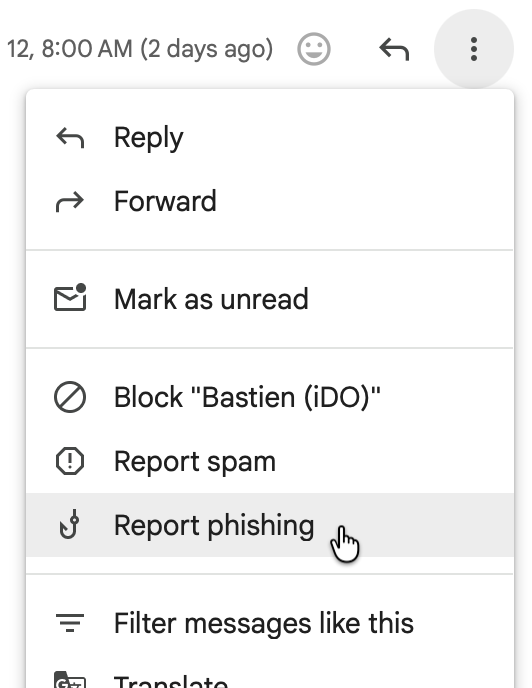
When you report a message as phishing, you’re doing more than removing it from your inbox. Your report alerts Technology to the phishing attempt so that we can investigate it. The sooner we receive those reports, the sooner we can respond—including working to identify and quarantine similar messages before more members of the Simmons community encounter them.
In Gmail on your computer while viewing the suspicious message:
- Select the three-dot menu next to the Reply button.
- Choose Report phishing.
There’s no need to forward the suspicious message to Technology. In fact, reporting it through Gmail is much more useful to us than forwarding it, because the report gives us what we need to begin investigating.
And if you’re not sure whether something is phishing? It’s okay to report it. We’d rather take a look.
What if I already clicked?
If you clicked a link in a suspicious message and possibly entered your Simmons username and password, contact the Technology Service Desk immediately.
We can help secure and thoroughly reset your account to make sure that someone else hasn’t gained access. The sooner you contact us, the sooner we can help protect both your account and the Simmons community.